HTTP 504, 503, and 502 errors
504 - Gateway timeout #
- As the http message description says if the Gateway doesn’t receive the response after a stipulated time, the http-request is timed out and it responds the same to the caller.
- If the the service is behind gateway/proxy-service it leads to 504-Gateway timeout
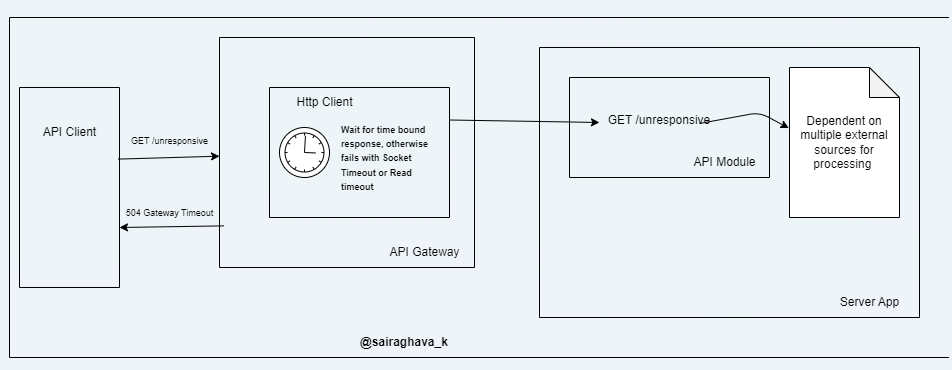
- Use-case
- Assume the default gateway timeout is set to 2 seconds.
- Now, consider a scenario where the service is taking longer than 2 seconds to process request in which case the gateway server is timed out and the api-client receives time out.
- Note that the app-server may still be processing the request, but it’s futile because the api-client already received 504 timeout.
- How to fix 504?
- Improve API Response Times
- Example: If the Gateway timeout is 2 Seconds, ensure the specific endpoint responds <= 2 seconds.
- Improve API Response Times
- Note: In the above image, the gateway component is not necessarily always an AzureGateway/KONG/Gravitee etc but could be a proxy/intermediate-service that could respond with 504 status code when the http-client is timed out.
503 - Service Unavailable #
- Use-case
- When all the application-server worker threads are occupied and no new threads are available not even in the waiting pool/queue then the service rejects all the new incoming requests with 503-service unavailable.
- How to fix 503?
- This issue indicates that the running service has received high-traffic or throughput beyond the capacity of the service to serve requests.
- Ensure that the app-server threads are released quickly and capable to handle the incoming load by scaling up horizontally with instances.
- For SpringBoot Apps
- Use DeferredResult to free up application worker threads
- Break down the complex request processing flow and assign the tasks to threads in thread pools.
- Use @Async in spring boot having dedicated thread-pools for specific category of tasks say “db-inserts” pool having threads that will do all database inserts.
502 - Bad Gateway #
- Use-case
- Consider the below request-response model
-
Request flow: UI -> EXT-GW -> Backend-Service-A -> INT-GW -> Backend-Service-B
-
Response flow: Backend-Service-B -> INT-GW -> Backend-Service-A -> EXT-GW -> UI
-
- Assumption: My system is setup with this kind of flow with both external gateway and internal gateways
- Sequence of response:
- First the response from downstream service
Backend-Service-Bsent back toINT-GW. - Then,
INT-GWappends extra headers and the same is received byBackend-Service-A.- Here
Backend-Service-Areceived200 OKfrom its downstream service.
- Here
- Now,
Backend-Service-Asent this response(headers + body) toEXT-GW. - Finally,
EXT-GWis returning 502-Bad Gateway to theUI- Here
UIreceived502
- Here
- First the response from downstream service
- Consider the below request-response model
- How to fix 502 or How it was fixed in my case?
- Before propagating response to
EXT-GWfromBackend-Service-A. I tried removing all the headers and sent just the body as part of response and it worked that isUIreceived expected200 OKresponse. - So clearly, the problem was with
EXT-GW. - As
EXT-GWcomponent was not in control, I would guess that it could be having response filter validations that has caused502.
- Before propagating response to